


Saner.ai
AI personal second brain and distraction-free workspace for deep work and notes
¿Qué es Saner.ai?
Saner.ai – AI Personal Assistant for Smarter Notes, Tasks and Knowledge Management
Saner.ai is an AI-powered personal productivity assistant that brings notes, tasks, documents, emails, and calendar information into one connected workspace. Designed to reduce information overload and simplify everyday planning, the platform helps users capture ideas, find previously saved knowledge, organize responsibilities, and identify important work without constantly switching between applications.
Unlike traditional note-taking software that primarily stores information, Saner.ai focuses on helping users put that information to work. Its AI assistant, Skai, can search connected knowledge, connect related ideas, assist with writing, and help turn scattered information into actionable tasks.
The platform is particularly designed around the challenges of attention management and context switching, making it relevant for people with ADHD as well as entrepreneurs, students, researchers, managers, and busy professionals.
What Is Saner.ai?
Saner.ai is an AI personal assistant and knowledge management platform that combines several everyday productivity workflows.
Users can save notes, import documents, connect supported services, manage tasks, and interact with their information through natural-language conversations.
For example, instead of manually searching through multiple documents and emails to find information about an upcoming meeting, users can ask the AI assistant to retrieve relevant details from their connected sources.
Similarly, a collection of unorganized notes can become easier to navigate through suggested tags, related information, and AI-powered search.
Saner.ai aims to function as a practical digital second brain: a place where useful information can be captured, rediscovered, and connected to everyday decisions.
Key Features of Saner.ai
1. AI-Powered Note Taking
Saner.ai allows users to capture ideas, research findings, meeting notes, reminders, and personal information in a centralized workspace.
Notes can include formatted text and supporting content, making the platform useful for both quick thoughts and more structured documents.
Users can organize their information into folders and access it later through the knowledge library.
The platform also provides AI assistance for improving and organizing notes, reducing the amount of manual work required to maintain a useful collection.
2. Skai AI Personal Assistant
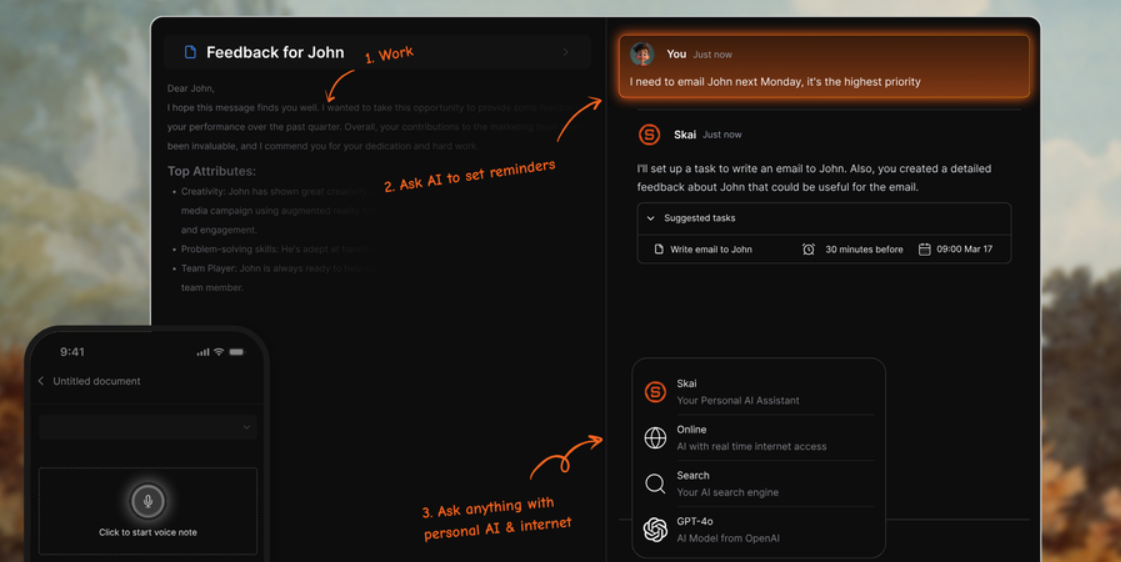
Skai is Saner.ai's built-in personal AI assistant.
It allows users to interact with their notes, tasks, and connected information using natural-language requests.
Instead of navigating several menus, users can ask questions, retrieve information, and request help with planning or organizing their work.
For example, a user might ask Skai to summarize information related to an ongoing project or help identify tasks mentioned in saved notes.
The assistant is designed to make stored information easier to use rather than leaving it buried in disconnected documents.
3. AI Task Management
Saner.ai combines note-taking with task organization.
Users can capture to-dos, manage responsibilities, and work with the AI assistant to plan their activities.
The task system helps connect information from notes and other supported sources with practical next steps.
This is useful when action items are scattered across emails, documents, and meeting discussions.
Instead of manually copying every action into a separate task manager, users can work toward managing their responsibilities from one workspace.
4. AI-Powered Daily Planning
Saner.ai provides a home screen designed to help users understand their priorities.
According to its product documentation, the system can use connected notes, tasks, emails, and calendar information to suggest a daily plan.
This may include identifying urgent responsibilities, highlighting important work, and suggesting manageable tasks.
The objective is to help users decide what deserves attention without repeatedly reviewing several applications.
5. Smart Knowledge Search
Finding information becomes difficult when notes and documents accumulate over time.
Saner.ai offers AI-assisted search that helps users retrieve relevant information from their saved knowledge.
Users can search using natural-language questions rather than relying only on exact keywords or file names.
The platform also supports finding related information across different notes and topics.
This makes it useful for research, project management, and personal knowledge organization.
6. Automatic Tags and Organization
Saner.ai includes AI-assisted organization features.
The platform can suggest tags based on note content and existing organizational patterns.
It can also surface related notes to help users discover connections between previously saved ideas.
These capabilities are useful for people who prefer capturing information quickly without spending excessive time manually categorizing everything.
7. Email, Calendar and Cloud Integrations
Saner.ai supports connections with external productivity services.
Its listed integrations include:
Gmail and email sources
Google Calendar
Google Drive
Slack
These connections allow supported information to become accessible within the Saner.ai workspace.
For example, a user may connect email and calendar information to support planning or import documents from Google Drive for knowledge retrieval.
The exact capabilities depend on the connected service and permissions granted.
8. AI Writing and Research Assistance
Saner.ai includes writing assistance and research-oriented capabilities.
Users can work with AI while reviewing notes and documents, helping them draft content, summarize information, and develop ideas.
This is relevant for students preparing study notes, professionals working on reports, and content creators organizing research.
The platform also supports accessing external AI models, although their usage charges are separate from Saner.ai's standard subscription allowances.
9. Voice Notes and OCR
Saner.ai supports voice-based information capture, allowing users to record ideas without typing everything manually.
It also lists OCR functionality for extracting readable information from supported visual or document content.
These features can help users capture information in different formats and make it more accessible for later reference.
10. Chrome Extension and Mobile Access
Saner.ai offers a Chrome extension and mobile app access.
These options help users capture information while browsing or working away from their main computer.
For example, a researcher may save useful material discovered online, while a professional can capture a quick idea from a mobile device.
The goal is to make information capture more convenient throughout the day.
How Does Saner.ai Work?
Saner.ai combines information capture, AI organization, and task planning into a connected workflow.
Step 1: Create an Account
Visit saner.ai and register for an account.
The platform offers a free plan, so users can explore its basic features without purchasing a subscription.
Step 2: Add Notes and Documents
Create notes, save ideas, or import supported files into the knowledge library.
Users can organize content into folders or use AI suggestions to assist with categorization.
Step 3: Connect Productivity Applications
Connect supported services such as Gmail, Google Drive, Google Calendar, or Slack.
This allows Saner.ai to work with additional information from the services the user authorizes.
Step 4: Ask Skai Questions
Use the AI assistant to search information, explore connections, summarize content, or get help with planning.
Natural-language questions can make it easier to find information without remembering where it was originally stored.
Step 5: Organize Tasks
Create tasks and review suggested priorities.
Use the task and calendar views to understand upcoming responsibilities.
Step 6: Review Your Daily Plan
Open the home screen to review relevant tasks, calendar commitments, and suggested priorities.
Adjust the plan according to your actual workload and preferences.
Who Should Use Saner.ai?
Professionals and Managers
Saner.ai can help professionals manage information spread across meetings, documents, emails, and task lists.
It is useful for keeping project context accessible and reducing the need to search through multiple applications.
People with ADHD
Saner.ai is designed with attention management and reduced context switching in mind.
Its simplified note capture, connected information, and AI-assisted task planning may be useful for people who find conventional productivity systems difficult to maintain.
It is a productivity tool, not a medical treatment or substitute for professional ADHD care.
Students and Researchers
Students can organize study notes, research material, and learning resources.
AI-powered retrieval can help them revisit previously saved information while preparing assignments or reviewing topics.
Entrepreneurs and Business Owners
Entrepreneurs often manage ideas, meetings, customer conversations, and operational responsibilities simultaneously.
Saner.ai provides a workspace for capturing those details and connecting them to tasks.
Content Creators and Writers
Creators can save research, develop content ideas, collect references, and use AI assistance when drafting or organizing material.
Freelancers
Freelancers managing several projects can use Saner.ai to organize client information, deadlines, notes, and daily responsibilities.
Saner.ai Pricing Plans
Saner.ai offers Free, Starter, and Standard plans.
| Feature | Free | Starter | Standard |
|---|---|---|---|
| Monthly Price | $0 | $8 | $16 |
| AI Messages | 30/month | 30/day | Unlimited* |
| Notes | 100 | 1,000 | Unlimited* |
| Storage | 100 MB | 5 GB | 100 GB |
| AI Requests | 30/month | 30/day | 100/day |
| PDF Limit | 1 MB/file | 5 MB/file | 10 MB/file |
| Task System | Included | Included | Included |
| Integrations | Included | Included | Included |
| Mobile App | Included | Included | Included |
Unlimited usage is subject to the provider's fair-use and acceptable-use policies.
The official pricing page also advertises a yearly billing discount.
An important consideration is that external AI models, such as third-party GPT, Claude, or Gemini models, may require separate pay-as-you-go charges or the user's own API keys. Their usage is not included automatically in the subscription price.
Prices and limits may change, so users should check the official pricing page before subscribing.
Benefits of Using Saner.ai
Centralized productivity: Bring notes, tasks, and connected information into one workspace.
AI-assisted knowledge retrieval: Search saved content through natural-language questions.
Reduced manual organization: Use suggested tags and related-note discovery.
Daily planning support: Review priorities using connected task and calendar information.
Flexible information capture: Save notes through web, mobile, and supported browser workflows.
Connected knowledge management: Make it easier to revisit information from multiple sources.
Free plan available: Explore basic features before upgrading.
ADHD-friendly design approach: Emphasizes simplicity, accessibility, and reduced context switching.
Limitations of Saner.ai
Although Saner.ai combines several productivity features, it may not replace every specialized application.
Users with advanced project management requirements may still need dedicated tools for complex team workflows, dependencies, or resource planning.
AI-generated summaries and suggested priorities should be reviewed because automated systems can miss context or interpret information incorrectly.
The free plan also has limits on notes, storage, and AI usage.
Users who want to work with third-party AI models should consider the additional costs associated with those services.
Connecting personal email, calendars, and documents also requires careful consideration of permissions and privacy settings.
Frequently Asked Questions
What is Saner.ai?
Saner.ai is an AI-powered personal assistant that combines notes, task management, knowledge search, and productivity planning in one workspace.
Is Saner.ai free?
Yes. Saner.ai offers a free plan with limited AI messages, notes, and storage.
What is Skai in Saner.ai?
Skai is the platform's personal AI assistant, designed to help users retrieve information, organize knowledge, and manage everyday tasks.
Is Saner.ai only for people with ADHD?
No. Although the platform emphasizes ADHD-friendly productivity, it is also designed for students, entrepreneurs, researchers, managers, and other professionals.
Can Saner.ai connect to Gmail and Google Drive?
Yes. The platform lists integrations with Gmail, Google Drive, Google Calendar, and Slack.
Does Saner.ai support task management?
Yes. It includes a task system with AI-assisted planning and prioritization features.
Can I use Saner.ai for research?
Yes. Users can organize research notes, import supported documents, search saved information, and use AI assistance to explore related ideas.
Does Saner.ai have a mobile app?
Yes. Mobile app access is listed among its supported features.
Does Saner.ai support external AI models?
Yes. Users can access supported third-party AI models, but additional charges or separate API keys may be required.
Is Saner.ai a second brain app?
Saner.ai can be used as a digital second brain because it helps users capture, organize, retrieve, and connect personal knowledge.
Can Saner.ai replace Notion or a task manager?
It may replace parts of a note-taking or task-management workflow for some users. However, suitability depends on the features, collaboration requirements, and customization options a user needs.
Final Verdict: Is Saner.ai Worth Trying?
Saner.ai is a useful option for people who want more than a conventional note-taking application.
Its combination of AI-assisted knowledge search, task organization, daily planning, and external integrations makes it relevant for managing information across everyday personal and professional workflows.
The platform's strongest appeal is its focus on reducing the effort required to capture information, find it later, and turn it into action.
For students, creators, entrepreneurs, and busy professionals looking for an AI-powered productivity assistant or digital second brain, Saner.ai offers a practical starting point with a free plan.
Modelo de Precios y Planes
Visit the official website for current tier pricing and enterprise quotes.
Community Reviews & Ratings
Independent Editorial Evaluation
This score reflects our staff's hands-on testing across pricing, features, and reliability. No community reviews submitted yet. Have you used Saner.ai? Be the first to share your experience!
No user reviews submitted yet.
Have you tried Saner.ai? Be the first to share your experience!
Want to review Saner.ai?
Sign in to leave a verified rating and feedback. Only verified members can rate tools to prevent spam.
Log In to Write a Review →Mejores Alternativas a Saner.ai
Top-rated alternative AI software in Productivity & Automation tested by our team.
View In-Depth Saner.ai Alternatives & Feature Matrix →


Top Prompts & Workflows for Saner.ai
Save time and extract maximum performance from Saner.ai with these tested, high-yield system prompts:
You are an expert specialist in Productivity & Automation. Analyze the following challenge and break it down into a 3-step high-yield execution plan: [Insert Project / Task Here]. Optimize for minimum latency and zero hallucinations.
Critically inspect the following output created by Saner.ai: [Insert Content Here]. Identify edge cases, logic gaps, or tone inconsistencies, and return a polished, production-grade rewrite.
Adopt the persona of a senior technical lead. Provide a step-by-step workflow on integrating Saner.ai with our existing stack. List recommended settings, shortcuts, and common pitfalls to avoid.
Embed the "Featured on AI Pulse" Badge
Are you the builder of Saner.ai? Showcase your official editorial verification by embedding our high-res dynamic SVG badge on your website footer or documentation.


