

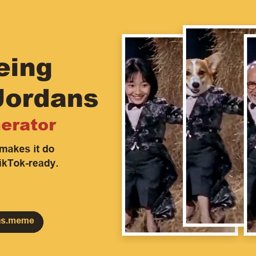
Tip Toeing in My Jordans Meme Generator
Turn any photo into the AI tip toe Rumpelstiltskin meme
ما هو Tip Toeing in My Jordans Meme Generator?
Tip Toeing in My Jordans Meme Generator – Create Your Own AI Tip Toe Meme Video
Tip Toeing in My Jordans Meme Generator is an AI-powered meme video creation tool that lets users transform personal photos, pet pictures, and illustrations into customized versions of the popular Tip Toeing in My Jordans meme.
Instead of creating an AI video from scratch, the tool provides a ready-made meme template featuring the recognizable tiptoeing dance, a fairy-tale-inspired barn setting, and exaggerated character movements.
Users can upload a photo, choose a character replacement mode, select a video format, and generate a personalized 12-second meme clip.
Designed for social media creators, meme enthusiasts, pet owners, and anyone who enjoys sharing funny videos, the generator simplifies the process of making AI meme content without requiring advanced video editing skills.
What Is the Tip Toeing in My Jordans Meme?
The Tip Toeing in My Jordans meme is a viral short-video trend featuring a small, imp-like character performing an exaggerated tiptoeing dance inside a rustic, candle-lit barn.
The scene includes a playful character moving toward a seated observer, creating a humorous and slightly surreal visual.
The clip is also commonly associated with the phrase AI Rumpelstiltskin meme, although the AI-generated scene should not be confused with footage from an official Rumpelstiltskin movie.
The meme became recognizable through its unusual animation style, distinctive dance movements, and association with the song "Tip Toe Wing In My Jawwdinz" by RiFF RAFF.
Online creators have adapted the format by replacing the original characters with friends, family members, pets, and fictional characters.
Tip Toeing in My Jordans Meme Generator is designed specifically for producing these personalized variations.
Key Features of Tip Toeing in My Jordans Meme Generator
1. AI-Powered Tip Toe Meme Video Creation
The generator transforms uploaded photos into short AI-generated meme videos based on the recognizable tiptoeing scene.
Users do not need to write complicated prompts or manually animate characters.
The tool uses a predefined video template to guide the setting, dance sequence, and overall visual presentation.
This makes it useful for people who want to participate in the meme trend without learning professional animation or video editing software.
2. Turn Your Photos into Meme Characters
Users can upload a personal photograph and use it as the reference for the dancing character.
The tool supports different types of visual subjects, including:
- Personal portraits
- Friends and family photos
- Pet photographs
- Character illustrations
- Drawings and artwork
- Group-chat joke characters
For better results, users should choose clear images with visible subjects and suitable lighting.
Full-body photographs can provide more reference information for character replacement, while portraits may work better for face-focused transformations.
AI-generated results can vary depending on the quality and composition of the uploaded image.
3. Full Body and Face Only Replacement Modes
The tool provides two character replacement options.
Full Body Mode
Full Body Mode uses the uploaded subject as a reference for the dancer's face, body, and outfit.
This allows users to create a personalized version of the dancing character while retaining the meme's recognizable movements and scene structure.
Face Only Mode
Face Only Mode keeps the original imp-like body and costume while replacing the face with the uploaded subject's face.
This option is suitable for users who want to preserve more of the original meme's visual appearance.
Both modes follow the predefined dance sequence and retain the distinctive pointed black shoes associated with the template.
4. Add a Second Character as the Observer
Tip Toeing in My Jordans Meme Generator supports an optional second photo upload.
The first image represents the dancer, while the second can be used for the seated observer who reacts to the performance.
This allows users to create humorous combinations such as:
- A friend dancing toward another friend
- A dog approaching a cat
- A family member surprising another relative
- Two fictional characters interacting
- A personalized group-chat joke
The second character is optional, so users can also generate a meme using only the dancer photo.
5. Generate 12-Second AI Meme Videos
Every generated video follows a 12-second format covering the complete tiptoeing dance sequence.
The fixed duration helps preserve the pacing and recognizable structure of the meme.
This makes the tool particularly suitable for short-form social media content and quick video sharing.
Rather than functioning as a general-purpose AI filmmaking platform, the generator focuses on producing variations of one specific meme format.
6. Vertical and Horizontal Video Formats
The generator supports two aspect ratios.
9:16 Vertical Format
Vertical videos are suitable for platforms such as:
- TikTok
- Instagram Reels
- YouTube Shorts
- Mobile-first social media feeds
16:9 Horizontal Format
Horizontal videos provide a wider composition that can be useful for desktop viewing, video collections, or sharing in landscape-oriented formats.
Users can select the framing that best suits their intended publishing platform.
Because the same scene is adapted to different aspect ratios, some visual details may be repositioned or cropped.
7. Choose Between 768P and 2K Video Quality
Tip Toeing in My Jordans Meme Generator offers two output quality options.
768P Video Quality
The 768P option is intended for everyday meme creation and casual social media sharing.
It uses fewer credits than the higher-quality option.
2K Video Quality
The 2K option provides a higher-resolution output for users who prefer sharper video presentation.
The selected quality affects credit consumption and may influence rendering time.
8. Free Instant Meme Preview
Before purchasing credits for a completed video, users can access a free instant preview.
The preview helps show how the uploaded photo may appear on the dancing character.
This allows users to evaluate the basic character placement before committing to a paid render.
The preview is an approximation rather than a guarantee that every detail will appear identically in the finished video.
9. Personal Video Library and Sharing
Completed meme videos are saved in the user's account Library.
Users can return to their generated clips to:
- Replay completed videos
- Download video files
- Copy shareable links
- Review previous creations
- Access different generated versions
Videos can be viewed by anyone who has the corresponding share link, but they are not publicly listed in a general gallery.
Uploaded source photos are described as private.
Users should still avoid sharing video links containing personal or sensitive content with people they do not trust.
10. Ready-to-Use Meme Caption Ideas
The tool also provides suggested captions inspired by the meme's humorous style.
These captions can help users prepare social media posts without writing every caption from scratch.
Examples include:
- "Me at 2 AM going for snacks"
- "My cat at 3 AM"
- "Sneaking back in after curfew"
- "When everyone thinks I'm asleep"
- "Me trying not to wake anyone up"
Users can adapt the captions to match their generated characters and intended audience.
How to Create a Tip Toeing in My Jordans AI Meme Video
The generator follows a straightforward photo-to-video workflow.
Step 1: Upload a Dancer Photo
Choose a clear photograph of yourself, a friend, a family member, a pet, or an illustrated character.
The first upload determines the subject used for the dancing role.
Step 2: Add an Optional Observer Photo
Upload a second image if you want to replace the seated observer in the scene.
This step is optional.
Step 3: Select a Character Replacement Mode
Choose between Full Body Mode and Face Only Mode.
Full Body Mode uses more of the uploaded character's appearance, while Face Only Mode preserves the original costume and body.
Step 4: Choose the Video Aspect Ratio
Select 9:16 for vertical social media videos or 16:9 for a wider composition.
Step 5: Select Video Quality
Choose between 768P and 2K, depending on your preferred resolution and available credits.
Step 6: Preview Your Character
Use the free instant preview to check the approximate character placement before starting a paid render.
Step 7: Generate Your Meme Video
Start the AI video rendering process.
Rendering typically takes approximately 15–20 minutes, although actual processing time depends on provider availability and selected quality.
Users can leave the page and return later to check progress through their Library.
Step 8: Download and Share
Once the video is complete, open it from the Library.
Users can replay the clip, download the video, or copy a share link for distribution.
Who Can Use Tip Toeing in My Jordans Meme Generator?
TikTok and Instagram Creators
Short-form video creators can use the generator to produce personalized versions of the meme for social media posts.
Meme Enthusiasts
People who enjoy viral internet trends can create humorous variations using their own photos and characters.
Friends and Group Chats
Friends can create personalized meme videos featuring familiar faces and inside jokes.
Pet Owners
Pet owners can experiment with turning photos of cats, dogs, and other pets into animated meme characters.
Families
Family members can create lighthearted videos using appropriately authorized photographs of relatives.
Digital Content Creators
Creators exploring AI-generated entertainment can use the tool to experiment with character replacement and template-based meme production.
Benefits of Using Tip Toeing in My Jordans Meme Generator
Simple Meme Creation
Generate a personalized meme without writing complex AI prompts.
Ready-Made Video Template
Use a predefined scene, dance sequence, and visual structure.
Flexible Character Replacement
Choose between full-body replacement and face-only customization.
Optional Two-Character Videos
Personalize both the dancer and observer for additional creative combinations.
Social Media-Friendly Formats
Create vertical or horizontal clips depending on your publishing needs.
Multiple Quality Options
Choose between 768P and 2K video generation.
Free Preview Before Rendering
Check approximate character placement before using paid credits.
No Recurring Subscription
Purchase one-time credit packs instead of maintaining a monthly subscription.
Tip Toeing in My Jordans Meme Generator Pricing
The generator uses a credit-based pricing model with one-time purchases.
There is no recurring subscription requirement.
Credits remain valid for 365 days after purchase.
Available Credit Packs
| Plan | Price | Included video allowance |
|---|---|---|
| Single | $8.99 | One 768P video |
| Trio | $17.99 | Three 768P videos or two 2K videos |
| Party | $34.99 | Six 768P videos or four 2K videos |
Users can mix 768P and 2K generations within their available credit balance.
A 768P video uses one standard video unit, while a 2K video uses 1.5 units.
If a rendering task fails or is canceled, the consumed credits are automatically returned to the account balance.
However, a successfully completed video that does not match a user's creative preference is not treated as a failed render.
Generating another variation requires additional credits.
Current prices and credit conditions should be confirmed before purchasing.
Music and Audio Considerations
The generator uses the meme template's soundtrack as an audio reference.
Generated clips may include audio, but the presence and consistency of the soundtrack are not guaranteed.
The AI may modify or omit audio during rendering.
The tool does not provide a license to use RiFF RAFF's original commercial recording.
Users who want to include the recognizable song should use music made available through their chosen social media platform's licensed audio library, subject to the platform's terms and account eligibility.
Music availability and permitted uses can vary between platforms, regions, and personal or commercial accounts.
Important Limitations
Tip Toeing in My Jordans Meme Generator is a specialized meme creation tool rather than a complete AI video production suite.
Its main limitations include:
- No custom scene prompt workflow
- No custom choreography creation
- Fixed 12-second video format
- AI-generated character consistency may vary
- Some visual details may change between frames
- Aspect ratio changes may crop or reposition elements
- Soundtrack inclusion is not guaranteed
- Rendering time depends on provider availability
Users should review generated clips before publishing.
Only upload images you have the right to use, and obtain appropriate consent before creating recognizable depictions of real people.
Generated videos should not be presented as authentic footage of events that never occurred.
Independent Fan-Made Meme Tool
Tip Toeing in My Jordans Meme Generator is an independent, fan-made AI video creation service.
It is not officially affiliated with RiFF RAFF, the creators of the original AI meme clip, or the producers of films and other media sometimes associated with the meme.
The tool is designed to help users create personalized variations of an existing internet meme through AI-generated character replacement.
Frequently Asked Questions
What is Tip Toeing in My Jordans Meme Generator?
It is an AI-powered meme video generator that turns uploaded photos into personalized versions of the Tip Toeing in My Jordans meme.
Can I create a Tip Toe meme using my own photo?
Yes. Users can upload a photograph and use it as the reference for the dancing character.
Can I use a pet photo?
Yes. The generator supports pet photographs, allowing users to experiment with personalized animal characters.
Does the tool support face swapping?
Yes. Face Only Mode replaces the dancer's face while retaining the original imp-like costume and body.
What is Full Body Mode?
Full Body Mode uses the uploaded photo as a reference for the dancer's face, body, and outfit.
Can I add two characters to the meme?
Yes. Users can upload a dancer photo and an optional observer photo.
How long are the generated videos?
Each completed video is designed to last 12 seconds.
What video formats are available?
The generator supports 9:16 vertical and 16:9 horizontal aspect ratios.
Can I generate videos in 2K quality?
Yes. Users can choose between 768P and 2K output options.
Is the Tip Toeing in My Jordans Meme Generator free?
The tool provides a free instant preview. Completed video generation uses paid credits purchased through one-time packs.
How long does video generation take?
Rendering usually takes approximately 15–20 minutes, although processing times may vary.
Do I need a subscription?
No. The generator uses one-time credit packs rather than recurring subscriptions.
Do unused credits expire?
Yes. Purchased credits are described as valid for 365 days.
Can I download my generated meme videos?
Yes. Completed videos can be accessed and downloaded through the user's account Library.
Are generated videos publicly visible?
Videos are not publicly listed in a general gallery, but anyone with a valid share link can view and download the corresponding clip.
Does the generated video include the original song?
The template uses a soundtrack reference, but audio is not guaranteed. The service does not grant a license to use the original commercial recording.
Can I create custom dance movements?
No. The generator focuses on the predefined tiptoeing dance rather than custom choreography.
Final Thoughts
Tip Toeing in My Jordans Meme Generator provides a focused way to create personalized AI meme videos using photographs, pets, illustrations, and familiar characters.
With a ready-made video template, two character replacement modes, optional observer customization, and support for vertical and horizontal formats, the tool makes it easier to experiment with the recognizable tiptoeing meme.
Its free preview and one-time credit system allow users to evaluate character placement before purchasing a completed render.
For social media creators, meme enthusiasts, and people looking to make humorous personalized videos, the generator offers a straightforward alternative to general-purpose AI video tools.
خطط ونماذج التسعير
Visit the official website for current tier pricing and enterprise quotes.
Community Reviews & Ratings
Independent Editorial Evaluation
This score reflects our staff's hands-on testing across pricing, features, and reliability. No community reviews submitted yet. Have you used Tip Toeing in My Jordans Meme Generator? Be the first to share your experience!
No user reviews submitted yet.
Have you tried Tip Toeing in My Jordans Meme Generator? Be the first to share your experience!
Want to review Tip Toeing in My Jordans Meme Generator?
Sign in to leave a verified rating and feedback. Only verified members can rate tools to prevent spam.
Log In to Write a Review →أفضل البدائل لـ Tip Toeing in My Jordans Meme Generator
Top-rated alternative AI software in Video Creation & Editing tested by our team.
View In-Depth Tip Toeing in My Jordans Meme Generator Alternatives & Feature Matrix →Top Prompts & Workflows for Tip Toeing in My Jordans Meme Generator
Save time and extract maximum performance from Tip Toeing in My Jordans Meme Generator with these tested, high-yield system prompts:
You are an expert specialist in Video Creation & Editing. Analyze the following challenge and break it down into a 3-step high-yield execution plan: [Insert Project / Task Here]. Optimize for minimum latency and zero hallucinations.
Critically inspect the following output created by Tip Toeing in My Jordans Meme Generator: [Insert Content Here]. Identify edge cases, logic gaps, or tone inconsistencies, and return a polished, production-grade rewrite.
Adopt the persona of a senior technical lead. Provide a step-by-step workflow on integrating Tip Toeing in My Jordans Meme Generator with our existing stack. List recommended settings, shortcuts, and common pitfalls to avoid.
Embed the "Featured on AI Pulse" Badge
Are you the builder of Tip Toeing in My Jordans Meme Generator? Showcase your official editorial verification by embedding our high-res dynamic SVG badge on your website footer or documentation.


