


ImgEdify
Free online AI photo editor & AI image generator.
Was ist ImgEdify?
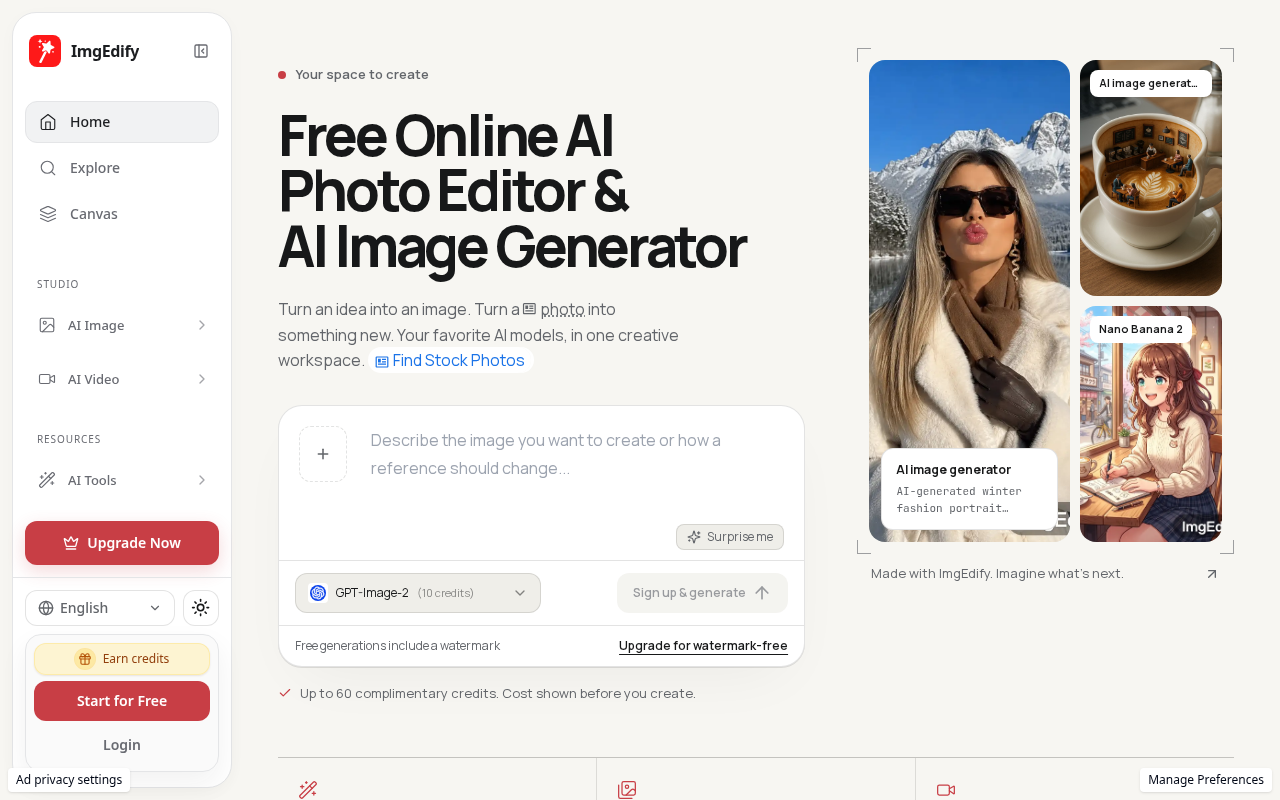
ImgEdify is a browser-based creative space for editing photos, generating images, and creating AI video. The product brings several visual workflows together on one website: text-to-image generation, image-to-image work, photo editing, text-to-video, image-to-video, and practical image utilities. People can use the service to explore a visual idea, prepare or adjust an existing image, or start a video from text or an image. ImgEdify describes itself as a free online AI photo editor and AI image generator, with free credits to get started and paid plans for users who need additional credits or watermark-free output.
A typical image workflow begins with a prompt or an image that the user wants to work with. For text-to-image, the user describes the desired visual result and chooses from the models presented by ImgEdify. For image-to-image, an existing image provides a starting point for a new visual direction. The site shows model choices and credit costs before generation, helping users compare options and understand the credit expense before running a task. This makes model selection and cost awareness part of the creative process rather than a hidden step after the result is produced.
ImgEdify lists models for image work such as GPT Image 2 and 2.5, Nano Banana 2 and Pro, and Qwen Image. Model availability and the options shown in the product are the relevant way to determine which model is appropriate for a particular project. The platform presents these as choices in a shared creative workspace, so a user can compare models and the displayed credit costs rather than needing to treat every visual task as identical. The listing does not rely on assumptions about model architecture or performance; users can inspect the options and costs shown in the live product.
For existing photographs and graphics, ImgEdify includes an AI photo editor and a set of quick utilities. Listed tools include background removal, creation of white or transparent backgrounds, face swap, hairstyle changes, Ghibli-style transformations, watermark removal for Gemini images, and conversion of an image to pixel art. These options support different kinds of image preparation and experimentation, from isolating a subject to trying a new look or adapting an image for a particular use. The utility set also includes resizing, compression, and format conversion, including HEIC to JPG and WebP-related conversion.
These tools can be useful at different stages of a creative project. A creator might remove a background before placing a subject into a new composition, resize and compress an image for a website, convert a file to a format that is easier to share, or use a style transformation to explore a visual concept. Someone preparing product images can use image editing and utility features to make assets more consistent for publication. A person experimenting with a photograph can try a face or hairstyle change, while a designer can use text-to-image or image-to-image to explore options before choosing a final direction. These examples describe workflows supported by the listed tools, not a guarantee of a particular result.
ImgEdify also includes AI video generation. The product materials identify text-to-video and image-to-video workflows and list models such as Veo 3.1, Seedance, Wan, Kling, and Hailuo. A user can start from written direction or an image and explore video generation with the options displayed by the site. The availability of several model choices makes it possible to compare the presented tools and their credit costs before starting. As with image generation, the exact available choices and costs should be checked in the product at the time of use.
The combination of image and video workflows is useful for creators who move between still visuals and motion. A user may begin with an image concept, prepare or adjust the image, and then use an image-to-video option to explore a moving version. Another user may start with a text prompt for a video and separately use an image-generation workflow to develop related visual assets. ImgEdify therefore offers a set of related creative capabilities in one browser-based environment, while keeping the choice of model and the associated credit cost visible to the user.
The product is relevant to independent creators, designers, social-media publishers, small businesses, and people who want to try AI-assisted visual tools without installing a desktop application. Typical needs include creating an image from text, changing an existing image, removing a background, making a quick file conversion, or exploring text- and image-based video generation. The utility tools are also suitable for occasional editing needs where resizing, compressing, or converting an image is more important than starting a full design project. Different users can focus on only the part of the workflow that is useful to them.
ImgEdify presents its available models and their credit costs before a generation, which gives users an opportunity to review the options and decide how to spend their credits. Free credits provide an entry point for trying the service. Paid plans add credits, and watermark-free output is described among the benefits of paid plans. The pricing information supplied for this listing describes the product as freemium, with yearly Basic, Lite, and Pro plans and additional higher-tier options; monthly plans are also offered. The current site should be consulted for the latest credit amounts, prices, and plan details, since pricing and model availability can change.
A practical way to evaluate ImgEdify is to choose one task, review the relevant model or utility, examine the credit cost shown, and then try the workflow using an appropriate image or prompt. For photo editing, a user can compare the available quick tools and select the operation that matches the desired edit. For image generation, the prompt and model choice guide the process. For video, the starting point can be text or an image, depending on the workflow being explored. This task-by-task approach helps a user understand what the product currently supports without making assumptions about unlisted features.
ImgEdify's tool collection is designed around practical visual work rather than a single kind of output. It covers prompt-based image creation, editing of existing images, conversion and optimization utilities, and generation of video from text or images. Users can use the site for experimentation, for preparing assets, or for exploring visual concepts. Model comparisons and visible credit costs are relevant to both exploration and planning, particularly for users who want to understand the cost of a generation before proceeding.
The overall value of ImgEdify is the ability to access multiple visual workflows in one online product, including tools that range from generation to everyday image preparation. A user can begin with the specific task at hand, use the corresponding feature, and consider other related capabilities only when needed. The product materials identify free credits, paid plans, a number of named image and video models, and utility tools such as background removal, resizing, compression, and format conversion. For current feature details, model choices, and pricing, users should refer to ImgEdify itself. This listing summarizes the capabilities described by the product and is intended to help prospective users decide whether its visual tools match their needs.
Preismodelle & Pläne
Visit the official website for current tier pricing and enterprise quotes.
Community Reviews & Ratings
Independent Editorial Evaluation
This score reflects our staff's hands-on testing across pricing, features, and reliability. No community reviews submitted yet. Have you used ImgEdify? Be the first to share your experience!
No user reviews submitted yet.
Have you tried ImgEdify? Be the first to share your experience!
Want to review ImgEdify?
Sign in to leave a verified rating and feedback. Only verified members can rate tools to prevent spam.
Log In to Write a Review →Beste Alternativen zu ImgEdify
Top-rated alternative AI software in Image Generation & Art tested by our team.
View In-Depth ImgEdify Alternatives & Feature Matrix →Top Prompts & Workflows for ImgEdify
Save time and extract maximum performance from ImgEdify with these tested, high-yield system prompts:
You are an expert specialist in Image Generation & Art. Analyze the following challenge and break it down into a 3-step high-yield execution plan: [Insert Project / Task Here]. Optimize for minimum latency and zero hallucinations.
Critically inspect the following output created by ImgEdify: [Insert Content Here]. Identify edge cases, logic gaps, or tone inconsistencies, and return a polished, production-grade rewrite.
Adopt the persona of a senior technical lead. Provide a step-by-step workflow on integrating ImgEdify with our existing stack. List recommended settings, shortcuts, and common pitfalls to avoid.
Embed the "Featured on AI Pulse" Badge
Are you the builder of ImgEdify? Showcase your official editorial verification by embedding our high-res dynamic SVG badge on your website footer or documentation.