

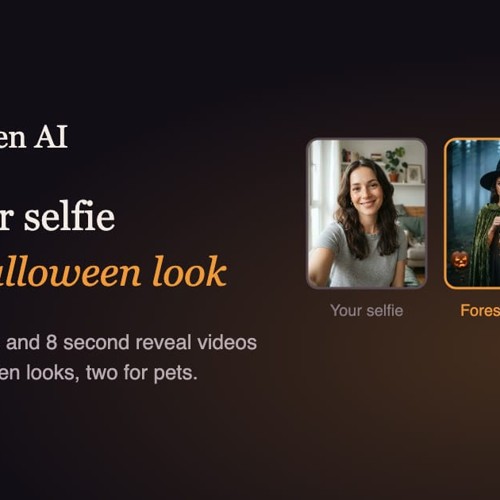
Halloween AI
Turn your selfie or pet photo into a Halloween costume
Was ist Halloween AI?
Halloween AI – Transform Your Photos into Spooky Halloween Costumes and Videos
Halloween AI is an online AI-powered photo editor that transforms everyday selfies and pet photographs into creative Halloween-themed portraits. Whether you want to see yourself as a mysterious vampire, a forest witch, a frightening zombie, or a playful devil, the platform makes it possible to explore different costumes without purchasing outfits or applying makeup.
With ten ready-made Halloween styles, realistic visual effects, and an easy-to-use interface, Halloween AI helps users create personalized seasonal content directly from their web browsers. The platform also supports animated costume reveals, Halloween profile pictures, and themed pet transformations.
Designed for casual users, social media creators, and Halloween enthusiasts, Halloween AI combines automated photo editing with creative costume design. Its freemium model includes one free image, allowing new users to experience the tool before purchasing additional credits.
What Is Halloween AI?
Halloween AI is a browser-based Halloween costume generator that uses artificial intelligence to transform uploaded photographs into themed portraits.
Unlike basic photo filters that add stickers or decorative overlays, Halloween AI creates a new visual composition around the original subject. The system applies costumes, makeup, atmospheric lighting, and themed backgrounds while aiming to preserve recognizable facial characteristics.
For example, an ordinary selfie can become a gothic vampire portrait featuring dramatic lighting, elegant clothing, and a castle setting. A photograph of a dog can be transformed into a playful Halloween image featuring a pumpkin outfit.
The platform is designed to produce visually cohesive images rather than simply placing digital accessories over an existing photograph.
Users can access Halloween AI from smartphones, tablets, and desktop computers without downloading additional software.
Key Features of Halloween AI
1. AI Halloween Costume Generator
The main attraction of Halloween AI is its collection of themed costume transformations.
Users upload a portrait, select a preferred Halloween style, and generate an AI-enhanced image featuring coordinated clothing, makeup, and environmental details.
The system is designed to retain important characteristics of the uploaded subject while introducing a new seasonal appearance.
This makes it useful for exploring costume ideas, creating themed photographs, and producing entertaining Halloween content.
2. Ten Creative Halloween Styles
Halloween AI includes ten predefined costume styles, with eight designed for people and two specifically developed for pets.
Each style offers a distinct combination of costume design, visual atmosphere, and lighting.
Forest Witch
Enter a mysterious woodland setting with a velvet cloak, an enchanted-looking hat, and a vintage lantern. This style emphasizes dark forest scenery and magical Halloween aesthetics.
Wedding Ghost
Create an eerie bridal portrait featuring distressed wedding clothing, faded roses, and atmospheric candlelight. The result combines gothic elegance with supernatural imagery.
Gothic Vampire
Transform your portrait into a dramatic vampire-inspired scene with pale makeup, a richly colored cape, and a candlelit castle environment.
Midnight Werewolf
Explore a supernatural transformation featuring wolf-like characteristics, amber-colored eyes, dramatic fur details, and moonlit surroundings.
80s Zombie
Reimagine your photograph with retro horror-inspired makeup, distressed facial effects, and a fog-covered suburban setting.
Cracked Porcelain
Create a haunting doll-inspired appearance with delicate porcelain textures, visible cracks, and stylized eyelashes.
Skeleton Makeup
Apply a dramatic skeleton-inspired makeup effect with defined bone patterns and strong facial contrast.
Red Devil
Generate a bold Halloween portrait featuring red horns, glittering makeup, and vibrant party-style lighting.
Pumpkin Pet
Turn a photograph of your cat or dog into an adorable Halloween portrait featuring a rounded pumpkin costume.
Glow Dino Pet
Give your pet a playful dinosaur-inspired appearance with a glowing costume and imaginative Halloween styling.
These options provide a mixture of spooky, elegant, dramatic, and humorous looks for different creative preferences.
3. AI Halloween Photo Editor
Halloween AI offers an automated alternative to traditional Halloween photo editing.
Instead of manually selecting clothing elements, adjusting shadows, or blending multiple image layers, users can generate a complete themed portrait from a single source photograph.
The system incorporates costume details, background elements, and lighting into the resulting image.
This approach can be particularly useful for people who want creative Halloween photographs without spending time learning advanced image editing techniques.
4. Animated Halloween Costume Reveal Videos
Beyond still photographs, Halloween AI includes a video generation feature called Costume Reveal.
This feature transforms a completed Halloween portrait into an eight-second animated sequence.
The video begins with the original photograph and transitions into the generated Halloween appearance.
Depending on the selected style, the transformation may include visual elements such as moving fabric, atmospheric fog, sparkling effects, dramatic lighting, or camera flashes.
The final frame displays the completed Halloween portrait.
These short animations are designed for vertical social media content, including Instagram Reels, TikTok videos, and Stories.
Each Costume Reveal video requires eight credits and is provided without a watermark.
5. Halloween AI Profile Picture Maker
Halloween AI also provides a dedicated option for generating seasonal profile pictures.
This feature creates square, head-and-shoulders compositions designed to remain recognizable when displayed as circular social media avatars.
Some Halloween styles work particularly well at smaller image sizes.
For example, Red Devil, Gothic Vampire, Skeleton Makeup, and Cracked Porcelain feature prominent visual elements that can remain noticeable in compact profile images.
Styles that emphasize scenery, such as Forest Witch or 80s Zombie, may be better suited to full-sized social media posts.
Users can also crop standard portrait outputs when preparing profile pictures for different platforms.
6. AI Halloween Costumes for Pets
Pet owners can create Halloween-themed photographs without physically dressing their animals in costumes.
Halloween AI includes two dedicated pet transformations: Pumpkin Pet and Glow Dino Pet.
These styles are intended for cat and dog photographs, providing a playful way to generate seasonal images.
A clear photograph showing the animal's face, eyes, and ears can help provide a suitable starting point for the transformation.
This feature is especially useful for pet-themed social media posts, Halloween greetings, and personal photo collections.
7. Reusable AI Halloween Prompts
Halloween AI provides access to the creative prompts associated with its costume styles.
These prompts describe important elements such as subject identity, costume details, makeup, background atmosphere, lighting, and visual characteristics to avoid.
Users can study these examples to better understand how AI image prompts are structured.
The prompts can also serve as starting points for experimentation with compatible image generation systems that support reference photographs.
This adds an educational dimension for users interested in AI prompt writing and image generation.
How to Use Halloween AI
Creating a Halloween portrait requires only a few steps.
Step 1: Upload Your Photograph
Open Halloween AI in your browser and upload a supported image.
The platform accepts JPG, PNG, and WebP files up to 10 MB.
For portraits, choose a photograph with a clearly visible face, natural lighting, and minimal obstruction around the eyes.
For pet transformations, select a photograph featuring one clearly visible animal.
Step 2: Select a Halloween Costume
Browse the available costume styles and choose the appearance you want to create.
Options range from supernatural characters to playful pet costumes.
After selecting a style, start the generation process.
Step 3: Generate Your Halloween Portrait
The AI processes the uploaded photograph and applies the selected visual transformation.
A typical portrait may be ready within approximately one or two minutes, although actual processing time can vary.
Each successful portrait generation costs one credit, with the first image available free for new users.
If a generation fails, the platform states that the associated credit is automatically returned.
Step 4: Download or Animate Your Image
Completed portraits appear in the My Creations section.
Users can download their results, unlock watermark-free images, or create animated Costume Reveal videos.
The available options depend on the user's credits and subscription status.
Who Should Use Halloween AI?
Social Media Enthusiasts
Users who enjoy changing their profile pictures or sharing seasonal content can create personalized Halloween portraits and animated transformations.
Halloween Party Guests
People preparing for Halloween celebrations can experiment with different costume aesthetics before choosing a look for their social media posts.
Pet Owners
Cat and dog owners can generate imaginative Halloween photographs without purchasing physical pet costumes.
Couples and Friends
Friends and couples can create coordinated Halloween portraits by uploading individual photographs and selecting complementary styles.
Content Creators
Creators producing seasonal entertainment content can use the platform to experiment with visual concepts, themed posts, and short costume reveal animations.
AI Art Beginners
The straightforward interface and predefined styles make Halloween AI accessible to users who are new to generative image editing.
Halloween AI Pricing and Credits
Halloween AI operates on a freemium credit-based pricing system.
New users receive their first portrait generation free. Additional images, watermark removal, and video creation require credits.
Credit Usage
- AI Halloween portrait: 1 credit
- Watermark removal: 1 credit per image
- Eight-second Costume Reveal video: 8 credits
- First portrait generation: Free
One-Time Credit Packages
| Credit Package | Price | Included Credits |
|---|---|---|
| Starter | $5.99 | 15 credits |
| Popular | $11.99 | 40 credits |
| Pro | $24.99 | 100 credits |
One-time credit purchases are described as remaining valid for one year.
The platform also offers monthly and annual subscription options that include watermark-free image downloads.
Monthly subscription credits expire at the end of their applicable billing period.
Users can manage or cancel subscriptions through the billing section. Applicable taxes may be added during checkout.
Pricing and subscription conditions may change. Check the official website before purchasing.
Image Downloads, Video Quality, and Storage
Halloween AI stores completed portraits in the My Creations section, allowing users to access previously generated content.
According to the platform's stated policies, generated results remain available for 30 days.
Free and one-time credit-pack image downloads include a watermark unless the image has been unlocked.
Watermark removal requires one credit per image. Once unlocked, the image can be downloaded without the watermark again.
Subscribers receive watermark-free image downloads as part of their subscription benefits.
Costume Reveal videos are eight seconds long and are generated without watermarks.
Privacy and Photo Protection
Halloween AI processes uploaded photographs to generate the requested images or videos.
According to the platform's stated privacy practices, uploaded source images expire after seven days, while generated results are removed after 30 days.
Users can also delete their creations manually.
The service states that it does not sell uploaded photographs or use them to train its own models.
Before uploading personal images, users should review the current privacy policy and understand how their photographs are processed.
When creating portraits involving friends, family members, or other identifiable individuals, obtaining permission is a responsible practice.
Advantages of Halloween AI
Halloween AI provides several practical benefits for users interested in seasonal AI-generated content.
Easy to use: The platform eliminates the need for complicated manual photo editing.
Creative costume selection: Ten predefined styles offer a variety of Halloween aesthetics.
Personalized results: Transformations are designed to preserve recognizable characteristics from the uploaded photograph.
Pet-friendly options: Dedicated pet styles support creative Halloween images for cats and dogs.
Animated video creation: Costume Reveal adds movement to completed portraits.
Browser-based access: The service works without installing a dedicated application.
Free initial experience: New users can generate their first portrait without purchasing credits.
Flexible payment options: One-time credit packs and subscriptions support different usage needs.
Things to Consider Before Using Halloween AI
Although Halloween AI simplifies creative photo editing, users should understand its limitations.
The platform focuses on a predefined collection of Halloween styles rather than unrestricted professional image editing.
Generated results may differ depending on the source photograph, subject positioning, lighting, and selected transformation.
Users who need extensive manual adjustments, precise compositing, or full video timeline editing may require additional software.
Credit usage is another consideration, especially when generating several images or animated videos.
For the best experience, start with a clear photograph and review the pricing and download conditions before making a purchase.
Frequently Asked Questions
Is Halloween AI free to use?
Yes. Halloween AI provides one free portrait generation for new users. Additional generations and certain features require credits or a subscription.
Can Halloween AI turn my selfie into a Halloween costume?
Yes. The platform transforms an uploaded selfie into a Halloween-themed portrait using AI-generated costumes, makeup, lighting, and backgrounds.
Does Halloween AI preserve my original face?
The tool is designed to maintain recognizable facial features, including face shape, skin tone, and expression. However, results may vary depending on the quality of the source image.
Can I create Halloween pictures of my pets?
Yes. Halloween AI offers Pumpkin Pet and Glow Dino Pet styles for cat and dog photographs.
How long does Halloween AI take to generate an image?
Portrait generation is described as typically taking approximately one to two minutes. Processing time may vary.
Can I turn a Halloween photo into a video?
Yes. The Costume Reveal feature creates an eight-second animated transformation from the original photograph to the completed Halloween portrait.
Are Halloween AI videos watermark-free?
The platform describes Costume Reveal videos as watermark-free. Image downloads have separate watermark conditions depending on the user's plan or credits.
What image formats are supported?
Halloween AI accepts JPG, PNG, and WebP uploads, with a maximum file size of 10 MB.
Can I use Halloween AI on my phone?
Yes. The platform runs through a web browser and is accessible on supported smartphones and desktop computers.
How long are my Halloween images stored?
Generated results are described as remaining available for 30 days, while uploaded source images expire after seven days.
Can I create matching Halloween portraits for couples?
Yes. Users can generate individual portraits with complementary costume styles and combine or display the results together.
Do I need professional editing skills?
No. Halloween AI uses a simplified workflow that allows beginners to generate Halloween portraits without advanced photo editing knowledge.
Final Verdict: Is Halloween AI Worth Trying?
Halloween AI is a convenient option for anyone who wants to experiment with AI-generated Halloween costumes, personalized spooky portraits, and short animated transformations.
Its combination of ten themed styles, pet costume options, profile picture generation, and Costume Reveal videos makes it useful for seasonal social media content and personal entertainment.
The platform is particularly suitable for casual users who prefer an automated creative experience over manual photo editing.
With a free first image and flexible credit-based options, Halloween AI offers an accessible introduction to Halloween-themed AI photo generation.
Whether you're preparing a seasonal profile picture, exploring costume ideas, or creating a playful Halloween portrait of your pet, Halloween AI provides a straightforward way to bring those concepts to life.
Preismodelle & Pläne
Visit the official website for current tier pricing and enterprise quotes.
Community Reviews & Ratings
Independent Editorial Evaluation
This score reflects our staff's hands-on testing across pricing, features, and reliability. No community reviews submitted yet. Have you used Halloween AI? Be the first to share your experience!
No user reviews submitted yet.
Have you tried Halloween AI? Be the first to share your experience!
Want to review Halloween AI?
Sign in to leave a verified rating and feedback. Only verified members can rate tools to prevent spam.
Log In to Write a Review →Beste Alternativen zu Halloween AI
Top-rated alternative AI software in Image Generation & Art tested by our team.
View In-Depth Halloween AI Alternatives & Feature Matrix →Top Prompts & Workflows for Halloween AI
Save time and extract maximum performance from Halloween AI with these tested, high-yield system prompts:
You are an expert specialist in Image Generation & Art. Analyze the following challenge and break it down into a 3-step high-yield execution plan: [Insert Project / Task Here]. Optimize for minimum latency and zero hallucinations.
Critically inspect the following output created by Halloween AI: [Insert Content Here]. Identify edge cases, logic gaps, or tone inconsistencies, and return a polished, production-grade rewrite.
Adopt the persona of a senior technical lead. Provide a step-by-step workflow on integrating Halloween AI with our existing stack. List recommended settings, shortcuts, and common pitfalls to avoid.
Embed the "Featured on AI Pulse" Badge
Are you the builder of Halloween AI? Showcase your official editorial verification by embedding our high-res dynamic SVG badge on your website footer or documentation.


